

I built a JavaScript framework called Brisa. The kind of framework that needs to parse every single source file your app contains; analyze imports, detect server vs. client components, inject macros, transform JSX. All of that happens at the AST level.
Before Brisa, I was already maintaining next-translate, an i18n library for Next.js. For the plugin that auto-injects locale loaders into pages, I used the TypeScript compiler API. It worked. It was also painfully slow; ts.createProgram() for every page file at build time, full type-checker instantiation, lib resolution. We had to add noResolve: true and noLib: true just to make it bearable. The parser was doing ten times more work than we needed because all we wanted was the AST, not the types.
When I started building Brisa, I knew I needed something faster. Something that gave me an ESTree-compliant AST without the overhead of a full compiler. That's how I found Meriyah.
Why I chose Meriyah over everything else
Meriyah is written entirely in JavaScript. No native bindings. No WASM loading step. No compilation step. Just parseScript(code, { jsx: true, module: true, next: true }) and you get back an ESTree AST in microseconds.
For Brisa's build pipeline, that speed difference compounds. Every source file in a Brisa project passes through Meriyah. The parser runs inside AST().parseCodeToAST(), which first transpiles via Bun's transpiler and then feeds the result to Meriyah. The output is a standard ESTree Program node that I can traverse, modify, and regenerate with astring.
But here's where it got interesting. Brisa has a feature called renderOn that lets you prerender components at build time. You write this in your page:
<SomeComponent renderOn="build" foo="bar" />
And at build time, the AST transform detects renderOn="build", replaces the JSX with a __prerender__macro() call, and injects this import at the top of the file:
import { __prerender__macro } from 'brisa/macros' with { type: 'macro' };
That with { type: 'macro' } is an import attribute that tells Bun's bundler to resolve the import at compile time. The component gets rendered during the build, and the result is injected as static HTML. The user writes renderOn="build", but under the hood the framework constructs ImportDeclaration and ImportAttribute AST nodes by hand and regenerates the code.
The problem: Meriyah didn't support import attributes when I started using it. So I contributed a PR to add the feature. That PR landed, and Brisa's entire prerender pipeline could work end to end.
Going from "the parser can't handle my syntax" to "I'll fix the parser itself" is the kind of thing that only happens when you understand ASTs well enough to read the parser's source code and see what's missing.
The inspiration
AST Explorer exists, and it's great. I use it regularly. It's the reference tool for exploring ASTs. I wanted to build something similar as part of Kitmul; my own version of an AST visualizer with parser selection, interactive tree view, and support for the parsers I use daily.
The AST Visualizer does exactly this. Paste JavaScript, pick your parser (Acorn, Meriyah, or SWC), and get an interactive tree or raw JSON. Everything runs locally in your browser.
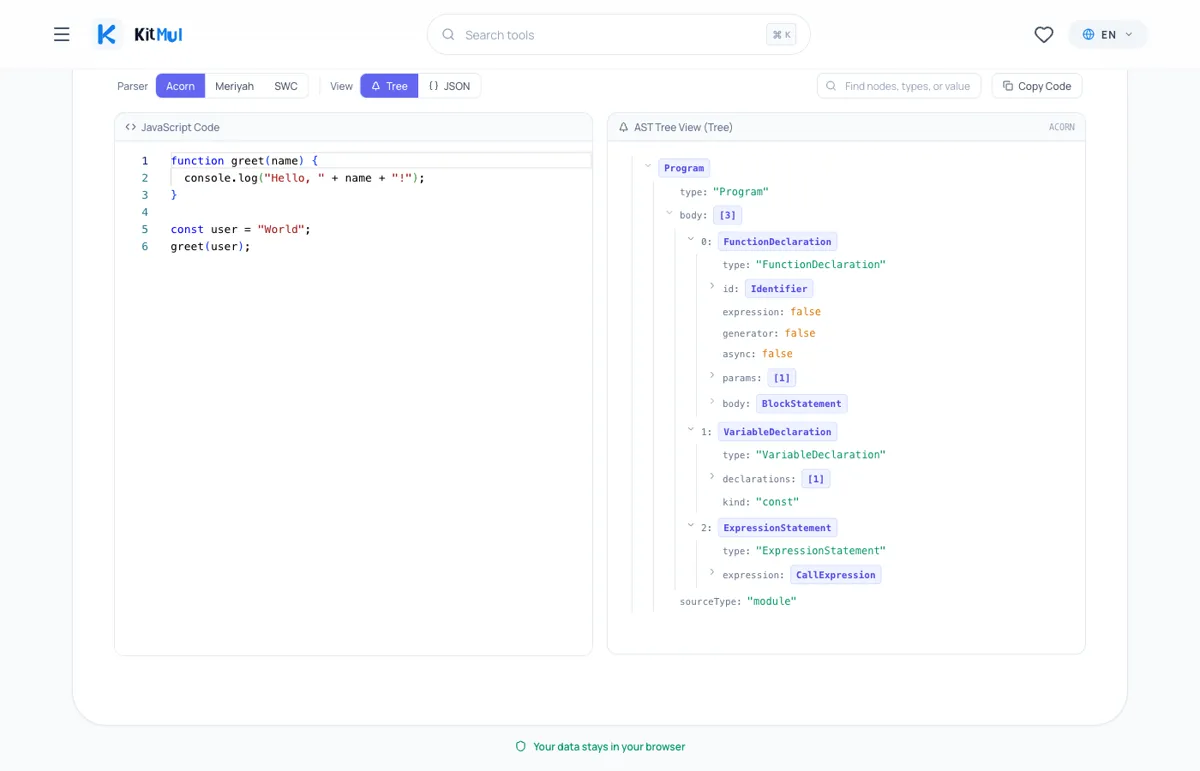
The parser choice matters because each one produces a slightly different AST:
- Acorn follows the ESTree spec strictly. It's the parser that ESLint uses internally. If you're writing ESLint rules, this is the tree your rule will traverse.
- Meriyah also follows ESTree, but adds JSX support and bleeding-edge features via the
next: trueflag. It's the parser I chose for Brisa because it's fast, lightweight, and written in pure JS. - SWC is a Rust-based compiler that runs via WASM in the browser. Its AST uses a different structure;
Moduleinstead ofProgram,spanobjects instead ofstart/endpositions. If you're working with Next.js or Turbopack internals, this is the AST you're dealing with.
Switching between parsers and seeing how the same code produces different trees is the fastest way to understand their trade-offs.
Three things the tree teaches you that docs don't
1. Expressions vs. statements are visible.
Every JavaScript developer hears "expression vs. statement" at some point. Few can articulate the difference until they see it in a tree. Consider:
x = 5;
The AST shows an ExpressionStatement wrapping an AssignmentExpression. The expression is the x = 5 part. The statement is the semicolon-terminated wrapper that makes it a standalone line. This distinction is why if (x = 5) is legal JavaScript; the assignment is an expression that returns a value.
2. Operator precedence is tree depth.
2 + 3 * 4
BinaryExpression (operator: "+")
├─ left: Literal (2)
└─ right: BinaryExpression (operator: "*")
           ├─ left: Literal (3)
           └─ right: Literal (4)
The multiplication is nested inside the addition's right operand. That's not a formatting choice; that's the parser encoding precedence into structure. The deeper node evaluates first. Parentheses change the tree structure, not some invisible priority flag.
3. Import attributes reveal how renderOn="build" works.
Parse this with Meriyah:
import { __prerender__macro } from 'brisa/macros' with { type: 'macro' };
The ImportDeclaration node gets an attributes array containing ImportAttribute nodes. Each attribute has a key and a value, both Literal nodes. This is the import that Brisa's build pipeline injects when it finds renderOn="build" on a component. The with { type: 'macro' } tells Bun to resolve the function at compile time. Without seeing the tree, you'd never guess that with { type: 'macro' } becomes a nested array of attribute objects.
Comparing parsers side by side
| Feature | Acorn | Meriyah | SWC |
|---|---|---|---|
| Language | JavaScript | JavaScript | Rust (WASM in browser) |
| Spec | ESTree | ESTree | SWC AST |
| JSX support | No | Yes | Yes |
| Import attributes | No | Yes | Yes |
| Speed | Fast | Very fast | Fast (after WASM load) |
| Bundle size | ~120KB | ~320KB | ~14MB (WASM) |
| Used by | ESLint | Brisa | Next.js, Turbopack |
The point isn't that one parser is better. Each one has trade-offs. Acorn is the standard. Meriyah is the fast, feature-rich option. SWC is the heavyweight that handles everything but requires loading 14MB of WASM. The AST Visualizer lets you switch between all three and see the differences.
Real use cases from building frameworks
I keep hearing "ASTs are for compiler people." No. ASTs are for anyone who writes tools that operate on code. Here's where I've actually used AST knowledge:
Framework build pipelines. In Brisa, every source file is parsed to an AST, analyzed for imports, transformed (macro injection, server/client separation, i18n processing), and regenerated as code. The central function is AST('tsx').parseCodeToAST(code), which returns an ESTree Program node. Without understanding the tree, I couldn't write a single one of those transforms.
Prerender macro injection via renderOn="build". When Brisa encounters <Foo renderOn="build" />, the AST transform constructs ImportAttribute nodes by hand to inject import {__prerender__macro} from 'brisa/macros' with { type: "macro" }. There's a quirk: Meriyah uses value on Literal nodes where astring expects name. That's an actual comment in the Brisa source code: // This astring is looking for "name", but meriyah "value". You only discover that kind of thing by staring at trees.
i18n loader injection. In next-translate-plugin, the Webpack loader uses ts.createProgram() to parse each page and detect its exports. It needs to know whether the page has getStaticProps, getServerSideProps, or a default export, so it can inject the right locale loader. The TypeScript AST uses SyntaxKind enums instead of string-based types, which is a different mental model from ESTree. Seeing both trees side by side clarifies the difference instantly.
Import path resolution. Brisa resolves relative imports to absolute paths during the build. The AST transform walks every ImportDeclaration, reads its source.value, resolves it against the file's directory, and replaces it. This is pure AST surgery; no regex, no string splitting.
Privacy
All three parsers run entirely in your browser. Acorn and Meriyah are JavaScript libraries that execute client-side. SWC loads a WASM binary from a local file. No code is transmitted to any server. No analytics track what you paste. If you're parsing proprietary source code, nothing leaves your device.
The actual takeaway
ASTs aren't magic. They're trees. Every piece of code you've ever written has a tree representation that a parser produces in milliseconds. The gap between "I've heard of ASTs" and "I can build a framework's compiler pipeline" is mostly about seeing enough trees that the patterns become obvious.
I went from struggling with the TypeScript compiler API in next-translate to contributing parser features to Meriyah for Brisa. The turning point wasn't reading more documentation. It was seeing enough ASTs that the node types became second nature.
The AST Visualizer won't teach you compiler theory. It'll teach you what the parser sees when it reads your code. For writing framework internals, build tools, codemods, and ESLint rules, that's the only thing that matters.
The AST Visualizer is free, private, and runs entirely in your browser. No signup, no install, no data leaves your device. Part of the Visualizers & Logic Tools collection on Kitmul.


